Run your Bigo Live room on real data, not guesswork
From the real number of online viewers in your Bigo Live room and a live chart of your room's heat, to revealing the real identity behind Bigo Live's own hidden-identity mode — all from one simple panel, in your own language.
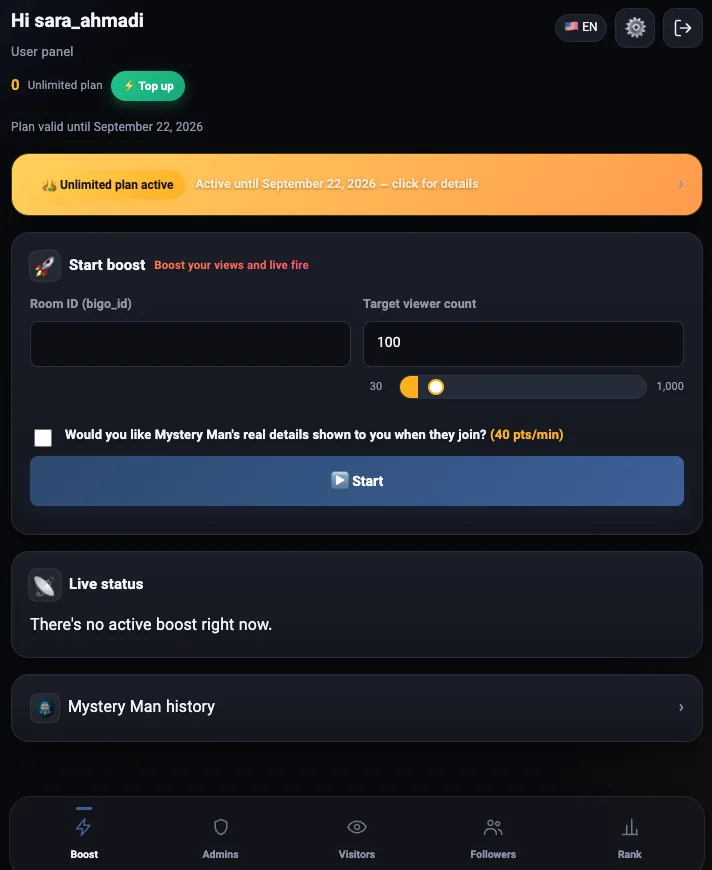
Set up in under a minute
No installation, no side app, no strange permissions needed.
Enter the room ID
The same public ID you see in the room link or your own profile in the Bigo Live app — copy it exactly as is.
Choose your target count
How many viewers do you want? Pick a number — the panel handles connecting to Bigo's servers and joining them for you.
Follow the live status
Peak, total joined, the room's heat chart, and — if you turned it on — Mystery Man alerts. All updated in real time.
Everything you need to manage a room
Not a one-trick tool — a complete panel.
Real live viewers, not a fake counter
Every time you hit start, the panel actually connects to Bigo's servers and joins viewers one by one — not a number that just climbs on a screen. If the host closes the room, the panel detects it and stops the boost automatically, so you don't have to remember to come back.
- Active count right now and total joined, tracked separately
- A history chart of the room's heat throughout the whole boost
- Automatic stop the moment the room actually goes offline
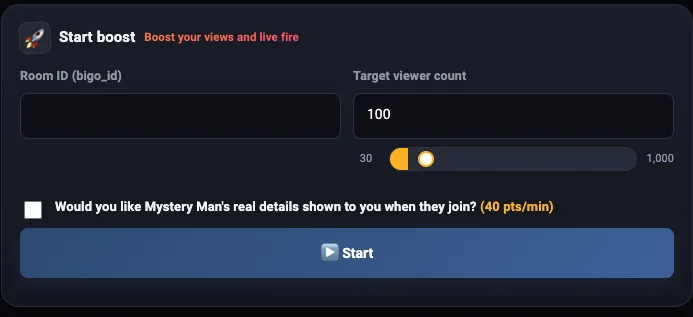
When someone joins with a hidden identity, find out who they really are
Bigo has an anonymous mode that lets a user join a room without showing their real name or photo ("Mystery Man"). Turn this option on when you start a boost, and the moment such a user joins, the panel uncovers their real identity (name, photo, level) and alerts you — keeping a permanent history you can revisit any time.
You're only billed for the time this option is actually on, minute by minute — any minute that starts counts as a full minute.

See the room's real data before you decide anything
Four separate lookups, each read straight from Bigo itself, in real time: the room's current visitor list, its admin list, any user's following/follower list, and the contribution ranking (daily, monthly, or all-time).
Pay only for what you actually use
The default is wallet billing: the cost is deducted instantly based on real traffic volume plus each guest's time in the room — not a fixed monthly package you pay for whether you use it or not. If you have heavy, steady usage, an unlimited plan can be set up too.
You can top up your wallet through either the Rial gateway or crypto (USDT).
Why a web panel, not an installed app?
Most similar tools are an app you install on your phone. That difference actually matters.
- Use your own phone's internet, RAM and CPU — your battery drains faster and the phone heats up.
- Depend on your own internet connection; a weak signal or filtering breaks them.
- Their coin/point deduction is usually unclear — you don't really know what you're charged for or how much.
- Usually limited to just adding viewers, with no extra information about the room itself.
- No installation needed — every connection runs on our own servers, not your phone. No battery drain, no data usage.
- The real connection to Bigo happens on our powerful servers across several countries — your own internet only needs to keep this lightweight page open.
- Every point deducted is exact: per MB, per guest-hour, or per minute of Mystery Man — all visible live.
- Beyond viewers, you also get Mystery Man's real identity, the room's current visitor list, its admin list, and the contribution ranking.
The panel speaks 8 languages, not just Persian
Because Bigo users aren't only Persian speakers, everything — from forms to error messages — has been translated.
Transparent, no hidden costs
You get two account types — switch between them whenever you want.
Wallet
Unlimited
Rates as of November 2026 — the panel always shows the live prices. Each package has fair-use limits (hours per boost, 200 boost-hours per 30 days, 3 rooms, 2 devices), shown in full before you buy.
Read this before you start
What is “Mystery Man” in Bigo Live?
Mystery Man is Bigo Live's anonymous mode: a viewer can enter a room without showing their real name, photo or level. If you turn on the Mystery Man option during a boost, MrBigo shows you who that viewer really is the moment they join, and keeps a history you can check later.
Do you need my Bigo Live password or account?
No. You only enter the public ID of the room you want to boost — you never give us your Bigo Live login. Your MrBigo account is separate: sign in with Google, an email code, or Telegram.
Can I use MrBigo from Telegram?
Yes. Open the @Bigoprobot bot and tap the 🚀 BOOSTER button: the panel opens right inside Telegram and signs you in automatically, no password needed. The bot also lets you know when your balance runs low or a boost stops.
What do the unlimited packages include?
Each package lasts 30 days, with a fixed price and a viewer cap (1,000, 2,000 or 3,000). Traffic and guest-hours aren't counted. For fair use, each boost runs for up to a few hours (4, 3 or 2 depending on the package), with 200 boost-hours per 30 days, up to 3 rooms and 2 devices. All limits are shown before you buy.
Where do I find the Bigo Live room ID?
It's the host's Bigo ID — shown under their name on their Bigo Live profile, and at the end of the room's share link (for example bigo.tv/ID). Copy it exactly, including any letters or dots.
Are the viewers real or simulated?
The panel genuinely connects to Bigo Live's servers and joins guest accounts — the same protocol the Bigo Live app itself uses. So it's not a cosmetic counter, it's a real connection.
What happens if I close the room while boosting?
The panel detects that the room went offline and stops the boost automatically — you don't need to come back and stop it manually, and no cost is counted from that moment on.
How exactly is Mystery Man billed?
It's billed minute by minute, only for the time this option is on — any minute that starts, even by a few seconds, counts as a full minute. Even if no Mystery Man is ever detected, you're still billed only for how long the option was on, not for how many were found.
Does it work on mobile?
Yes, the whole panel is responsive and works from a mobile browser — no app install needed.
How does the referral system work?
You get a dedicated referral link. Anyone who signs up and tops up through it gets bonus points, and so do you — no cap, no limit on how many.
What payment methods are supported?
Both the Rial payment gateway (bank card) and crypto payment with Tether (USDT) are supported - top up your wallet with either method, whenever you like.
Start right now
Sign-up takes a few seconds; cost is only counted once you actually use it.